Services
Choose your seat
Reserve your seat directly in the HAIVAN app
You can choose your seat while booking your ticket
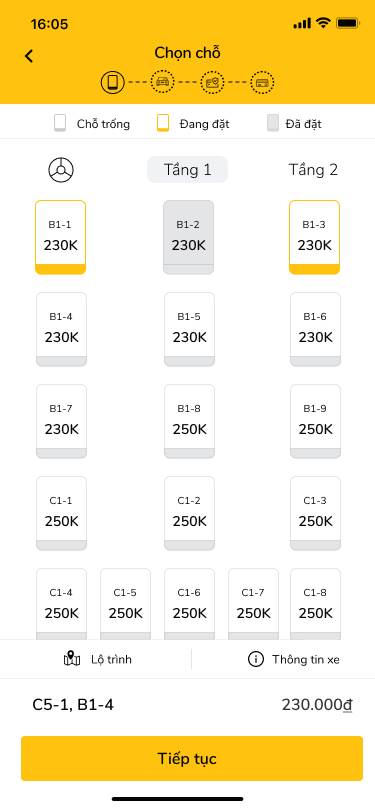
After choosing your locations, you will be taken to the seat selection screen
Check the seat map and pick your preferred seat. Seats shaded dark grey cannot be reserved. Your seat will be highlighted in yellow
Continue to complete your booking. Your seat number will be shown on your ticket
On board, seat numbers are displayed along the aisle and on each seat
Or
You can also reserve a seat by calling our hotline 1900 6763
How do I find my seat on the bus?
On every trip, any seat or cabin on the vehicle can be reserved in advance.
If you have reserved a specific seat, you will find your seat number on your ticket. On vehicles with seat reservations, seat numbers are shown at eye level, and for cabin tickets the number is displayed on your cabin.
If you have not reserved a seat but your ticket shows an assigned seat, please sit in that seat.
If you have not reserved a seat and your ticket shows no assigned seat, the bus attendant will find a suitable seat for you. Priority seating is given to passengers with reduced mobility, older passengers and pregnant women.
Adding, changing and cancelling seat reservations
You can only choose a seat in advance while booking your ticket. After that, you cannot add or reserve a seat once your ticket is confirmed. If you would like to cancel or change your seat, please contact our customer service team.